Post new topic Reply to topic  [ 11 posts ] 
  Print view Previous topic | Next topic 
Author Message
 Post subject: [help]with my server!
PostPosted: Mon Mar 08, 2010 11:18 pm 
Vassal

Joined: Mon Feb 01, 2010 7:38 pm
Posts: 30
Guys i need rly help!
Im in the last part to open my server :(
but when im try to change the serveraddr (from l2.ini) from 127.0.0.1 to my ip i cant log in :/
If i change it again to 127.0.0.1 i can :S

Wtf happent ? :/

Is any other way to open my server ON-LINE?
Please post only those who know my problem!
help help help help help help help help :( !!!


Reply with quote
Top
 OfflineProfile  
 Post subject: Re: [help]with my server!
PostPosted: Tue Mar 09, 2010 11:40 am 
Duke

Joined: Fri Nov 16, 2007 3:03 pm
Posts: 2034
you need to set the server/login properities external ip to yours and add it to the hosts file too
i alrdy told you


Reply with quote
Top
 OfflineProfile  
 Post subject: Re: [help]with my server!
PostPosted: Tue Mar 09, 2010 12:34 pm 
Vassal

Joined: Mon Feb 01, 2010 7:38 pm
Posts: 30
Lhyno wrote:
you need to set the server/login properities external ip to yours and add it to the hosts file too
i alrdy told you

can you tell me how can i do this ?
dont ingored me im last part plx ^^
Here is my Server.proper..:
# ---------------------------------------------------------------------------
# Game Server Settings
# ---------------------------------------------------------------------------
# This is the server configuration file. Here you can set up the connection information for your server.
# This was written with the assumption that you are behind a router.
# Dumbed Down Definitions...
# LAN (LOCAL area network) - typically consists of computers connected to the same router as you.
# WAN (WIDE area network) - typically consists of computers OUTSIDE of your router (ie. the internet).
# x.x.x.x - Format of an IP address. Do not include the x'es into settings. Must be real numbers.
# ---------------------------------------------------------------------------
# Networking
# ---------------------------------------------------------------------------
# This is transmitted to the clients connecting from an external network, so it has to be a public IP or resolvable hostname
# Common settings...
# 127.0.0.1 - If you are playing alone on a test server
# 192.168.x.x - This is if you are on a 192.168.x.x type network (behind a standard consumer router) and want other computers from JUST the internal network to be able to connect
# x.x.x.x - WAN IP obtained from http://www.whatismyip.com/. This is if you want people outside your internal network to be able to connect to your server.
# If this IP is resolvable by the Login Server, just leave *.
# ---------------------------------------------------------------------------
# Default: *
ExternalHostname = darknebula.no-ip.biz
# ---------------------------------------------------------------------------
# This is transmitted to the client from the same network, so it has to be a local IP or resolvable hostname.
# This can be the internal IP such as 127.0.0.1 or the computer's IP such as 192.168.x.x.
# If this IP is resolvable by the Login Server, just leave *.
# ---------------------------------------------------------------------------
# Default: *
InternalHostname = 192.168.1.5

# Where's the Login server this gameserver should connect to
# Default: 127.0.0.1
LoginHost = 127.0.0.1
# TCP port the login server listen to for gameserver connection requests
# Default: 9014
LoginPort = 9014
# Default: *
GameserverHostname = *
# Default: 7777
GameserverPort = 7777


# ---------------------------------------------------------------------------
# Database
# ---------------------------------------------------------------------------
# Specify the appropriate driver and url for the database you're using.
# Examples:
# Driver = com.mysql.jdbc.Driver (default)
# Driver = org.hsqldb.jdbcDriver
# Driver = com.microsoft.sqlserver.jdbc.SQLServerDriver
Driver = com.mysql.jdbc.Driver
# Database URL
# URL = jdbc:mysql://localhost/l2jdb (default)
# URL = jdbc:hsqldb:hsql://localhost/l2jdb
# URL = jdbc:sqlserver://localhost/database = l2jdb/user = sa/password =
URL = jdbc:mysql://localhost/l2jdb
# Database user info (default is "root" but it's not recommended)
Login = root
# Database connection password
Password =

# Default: 100
MaximumDbConnections = 100

# Default: 0
MaximumDbIdleTime = 0

# ---------------------------------------------------------------------------
# Misc Server Settings
# ---------------------------------------------------------------------------
# This is the server ID that the Game Server will request.
# Example: 1 = Bartz
# Default: 1
RequestServerID = 2

# True = The Login Server will give an other ID to the server if the requested ID is already reserved.
# Default: True
AcceptAlternateID = True

# Datapack root directory.
# Defaults to current directory from which the server is started unless the below line is uncommented.
#DatapackRoot = C:/Work/tmp/DataPack

# Define how many players are allowed to play simultaneously on your server.
# Default: 100
MaximumOnlineUsers = 1000

# Minimum and maximum protocol revision that server allow to connect.
# Warning: You must make sure that the minimum revision is always less than or equal to the maximum revision.
# WARNING: <u><b><font color="red">Changing the protocol revision may result in incompatible communication and many errors in game!</font></b></u>
# Default: 146
MinProtocolRevision = 1

# Minimum and maximum protocol revision that server allow to connect.
# Warning: You must make sure that the minimum revision is always less than or equal to the maximum revision.
# WARNING: <u><b><font color="red">Changing the protocol revision may result in incompatible communication and many errors in game!</font></b></u>
# Default: 146
MaxProtocolRevision = 999


# ---------------------------------------------------------------------------
# Misc Player Settings
# ---------------------------------------------------------------------------

# Character name template.
# Examples:
# CnameTemplate = [A-Z][a-z]{3,3}[A-Za-z0-9]*
# The above setting will allow names with first capital letter, next three small letters,
# and any letter (case insensitive) or number, like OmfgWTF1
# CnameTemplate = [A-Z][a-z]*
# The above setting will allow names only of letters with first one capital, like Omfgwtf
# Default .* (allows any symbol)
CnameTemplate = .*

# This setting restricts names players can give to their pets.
# See CnameTemplate for details
PetNameTemplate = .*

# Maximum number of characters per account.
# Default: 7 (client limit)
CharMaxNumber = 7

And loginserver


# ---------------------------------------------------------------------------
# Login Server Settings
# ---------------------------------------------------------------------------
# This is the server configuration file. Here you can set up the connection information for your server.
# This was written with the assumption that you are behind a router.
# Dumbed Down Definitions...
# LAN (LOCAL area network) - typically consists of computers connected to the same router as you.
# WAN (WIDE area network) - typically consists of computers OUTSIDE of your router (ie. the internet).
# x.x.x.x - Format of an IP address. Do not include the x'es into settings. Must be real numbers.
# ---------------------------------------------------------------------------
# Networking
# ---------------------------------------------------------------------------
# This is transmitted to the clients connecting from an external network, so it has to be a public IP or resolvable hostname
# Common settings...
# 127.0.0.1 - If you are playing alone on a test server
# 192.168.x.x - This is if you are on a 192.168.x.x type network (behind a standard consumer router) and want other computers from JUST the internal network to be able to connect
# x.x.x.x - WAN IP obtained from http://www.whatismyip.com/. This is if you want people outside your internal network to be able to connect to your server.
# ---------------------------------------------------------------------------
# Default: 127.0.0.1
ExternalHostname = darknebula.no-ip.biz

# ---------------------------------------------------------------------------
# This is transmitted to the client from the same network, so it has to be a local IP or resolvable hostname.
# This can be the internal IP such as 127.0.0.1 or the computer's IP such as 192.168.x.x.
# ---------------------------------------------------------------------------
# Default: 127.0.0.1
InternalHostname = 192.168.1.5

# ---------------------------------------------------------------------------
# If you are behind a router which using its own local IP for Port Forwarding then set this to the routers
# local IP if you want people outside your internal network to be able to connect to your server.
# ---------------------------------------------------------------------------
# RouterHostname =

# Bind ip of the LoginServer, use * to bind on all available IPs
# Default: *
LoginserverHostname = *
# Default: 2106
LoginserverPort = 2106

# The address on which login will listen for GameServers, use * to bind on all available IPs
# Default: *
LoginHostname = *
# The port on which login will listen for GameServers
# Default: 9014
LoginPort = 9014

# The delay in minutes after which the login updates the gameservers IP's (usefull when their ip is dynamic)
# Default: 15
IpUpdateTime = 15


# ---------------------------------------------------------------------------
# Security
# ---------------------------------------------------------------------------
# Default: True
LogLoginController = True

# How many times you can provide an invalid account/pass before the IP gets banned.
# Default: 10
LoginTryBeforeBan = 10

# Time you won't be able to login back again after LoginTryBeforeBan tries to login.
# Default: 600 (10 minutes)
LoginBlockAfterBan = 600

# If set to True any GameServer can register on your login's free slots
# Default: False
AcceptNewGameServer = False

# Enforce GameGuard authorization from client?
# If True, login server will kick client if the client bypassed GameGuard authentication.
# Default: False
ForceGGAuth = False

# Flood Protection. All values are in MILISECONDS.
# Default: True
EnableFloodProtection = True

# Default: 15
FastConnectionLimit = 15

# Default: 700
NormalConnectionTime = 700

# Default: 350
FastConnectionTime = 350

# Default: 50
MaxConnectionPerIP = 50


# ---------------------------------------------------------------------------
# Database
# ---------------------------------------------------------------------------
# Specify the appropriate driver and url for the database you're using.
# Examples:
# Driver = com.mysql.jdbc.Driver (default)
# Driver = org.hsqldb.jdbcDriver
# Driver = com.microsoft.sqlserver.jdbc.SQLServerDriver
Driver = com.mysql.jdbc.Driver
# Database URL
# URL = jdbc:mysql://localhost/l2jdb (default)
# URL = jdbc:hsqldb:hsql://localhost/l2jdb
# URL = jdbc:sqlserver://localhost/database = l2jdb/user = sa/password =
URL = jdbc:mysql://localhost/l2jdb
# Database user info (default is "root" but it's not recommended)
Login = root
# Database connection password
Password =

# Default: 10
MaximumDbConnections = 10

# Default: 0
MaximumDbIdleTime = 0


# ---------------------------------------------------------------------------
# Misc.
# ---------------------------------------------------------------------------
# If False, the license (after the login) will not be shown.
# Default: True
ShowLicence = True

# Default: True
AutoCreateAccounts = True


# ---------------------------------------------------------------------------
# Developer Settings
# ---------------------------------------------------------------------------
# Default: False
Debug = False

# Default: False
Assert = False

# Default: False
Developer = False

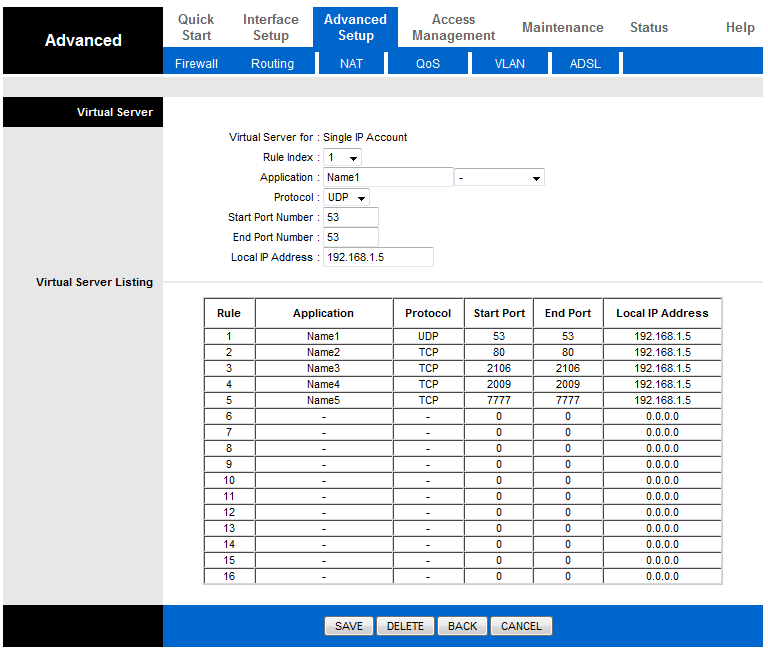
And here is my ports (If is it correct)
Image

And i fix my host like:

127.0.0.1 L2authd.lineage2.com
darknebula.no-ip.biz L2authd.Lineage2.com


Reply with quote
Top
 OfflineProfile  
 Post subject: Re: [help]with my server!
PostPosted: Tue Mar 09, 2010 2:33 pm 
Duke

Joined: Fri Nov 16, 2007 3:03 pm
Posts: 2034
bozZo wrote:
# 127.0.0.1 - If you are playing alone on a test server
# 192.168.x.x - This is if you are on a 192.168.x.x type network (behind a standard consumer router) and want other computers from JUST the internal network to be able to connect
# x.x.x.x - WAN IP obtained from http://www.whatismyip.com/. This is if you want people outside your internal network to be able to connect to your server.
# If this IP is resolvable by the Login Server, just leave *.
# ---------------------------------------------------------------------------
# Default: *
ExternalHostname = darknebula.no-ip.biz
# ---------------------------------------------------------------------------
# This is transmitted to the client from the same network, so it has to be a local IP or resolvable hostname.
# This can be the internal IP such as 127.0.0.1 or the computer's IP such as 192.168.x.x.
# If this IP is resolvable by the Login Server, just leave *.
# ---------------------------------------------------------------------------
# Default: *
InternalHostname = 192.168.1.5

# Where's the Login server this gameserver should connect to
# Default: 127.0.0.1
LoginHost = 127.0.0.1
# TCP port the login server listen to for gameserver connection requests
# Default: 9014
LoginPort = 9014
# Default: *
GameserverHostname = *
# Default: 7777
GameserverPort = 7777


# Login Server Settings
# 127.0.0.1 - If you are playing alone on a test server
# 192.168.x.x - This is if you are on a 192.168.x.x type network (behind a standard consumer router) and want other computers from JUST the internal network to be able to connect
# x.x.x.x - WAN IP obtained from http://www.whatismyip.com/. This is if you want people outside your internal network to be able to connect to your server.
# ---------------------------------------------------------------------------
# Default: 127.0.0.1
ExternalHostname = darknebula.no-ip.biz

# ---------------------------------------------------------------------------
# This is transmitted to the client from the same network, so it has to be a local IP or resolvable hostname.
# This can be the internal IP such as 127.0.0.1 or the computer's IP such as 192.168.x.x.
# ---------------------------------------------------------------------------
# Default: 127.0.0.1
InternalHostname = 192.168.1.5

# ---------------------------------------------------------------------------
# If you are behind a router which using its own local IP for Port Forwarding then set this to the routers
# local IP if you want people outside your internal network to be able to connect to your server.
# ---------------------------------------------------------------------------
# RouterHostname =

# Bind ip of the LoginServer, use * to bind on all available IPs
# Default: *
LoginserverHostname = *
# Default: 2106
LoginserverPort = 2106

# The address on which login will listen for GameServers, use * to bind on all available IPs
# Default: *
LoginHostname = *
# The port on which login will listen for GameServers
# Default: 9014
LoginPort = 9014

And i fix my host like:

127.0.0.1 L2authd.lineage2.com
darknebula.no-ip.biz L2authd.Lineage2.com


in the first part the loginhost is already wrong, since it's localhost address

but these are what u need to check to be right, i don't know your in-ex ip so u have to know that
the hosts file like this is set only for localhost-server
you need the authorization and host address to add, not localhost


Reply with quote
Top
 OfflineProfile  
 Post subject: Re: [help]with my server!
PostPosted: Tue Mar 09, 2010 2:37 pm 
Vassal

Joined: Mon Feb 01, 2010 7:38 pm
Posts: 30
Lhyno wrote:
bozZo wrote:
# 127.0.0.1 - If you are playing alone on a test server
# 192.168.x.x - This is if you are on a 192.168.x.x type network (behind a standard consumer router) and want other computers from JUST the internal network to be able to connect
# x.x.x.x - WAN IP obtained from http://www.whatismyip.com/. This is if you want people outside your internal network to be able to connect to your server.
# If this IP is resolvable by the Login Server, just leave *.
# ---------------------------------------------------------------------------
# Default: *
ExternalHostname = darknebula.no-ip.biz
# ---------------------------------------------------------------------------
# This is transmitted to the client from the same network, so it has to be a local IP or resolvable hostname.
# This can be the internal IP such as 127.0.0.1 or the computer's IP such as 192.168.x.x.
# If this IP is resolvable by the Login Server, just leave *.
# ---------------------------------------------------------------------------
# Default: *
InternalHostname = 192.168.1.5

# Where's the Login server this gameserver should connect to
# Default: 127.0.0.1
LoginHost = 127.0.0.1
# TCP port the login server listen to for gameserver connection requests
# Default: 9014
LoginPort = 9014
# Default: *
GameserverHostname = *
# Default: 7777
GameserverPort = 7777


# Login Server Settings
# 127.0.0.1 - If you are playing alone on a test server
# 192.168.x.x - This is if you are on a 192.168.x.x type network (behind a standard consumer router) and want other computers from JUST the internal network to be able to connect
# x.x.x.x - WAN IP obtained from http://www.whatismyip.com/. This is if you want people outside your internal network to be able to connect to your server.
# ---------------------------------------------------------------------------
# Default: 127.0.0.1
ExternalHostname = darknebula.no-ip.biz

# ---------------------------------------------------------------------------
# This is transmitted to the client from the same network, so it has to be a local IP or resolvable hostname.
# This can be the internal IP such as 127.0.0.1 or the computer's IP such as 192.168.x.x.
# ---------------------------------------------------------------------------
# Default: 127.0.0.1
InternalHostname = 192.168.1.5

# ---------------------------------------------------------------------------
# If you are behind a router which using its own local IP for Port Forwarding then set this to the routers
# local IP if you want people outside your internal network to be able to connect to your server.
# ---------------------------------------------------------------------------
# RouterHostname =

# Bind ip of the LoginServer, use * to bind on all available IPs
# Default: *
LoginserverHostname = *
# Default: 2106
LoginserverPort = 2106

# The address on which login will listen for GameServers, use * to bind on all available IPs
# Default: *
LoginHostname = *
# The port on which login will listen for GameServers
# Default: 9014
LoginPort = 9014

And i fix my host like:

127.0.0.1 L2authd.lineage2.com
darknebula.no-ip.biz L2authd.Lineage2.com


in the first part the loginhost is already wrong, since it's localhost address

but these are what u need to check to be right, i don't know your in-ex ip so u have to know that
the hosts file like this is set only for localhost-server
you need the authorization and host address to add, not localhost


hmmm...where i can find that?
or something else, how can other log in to my server without change my system(l2.ini) I mean to send them only host not the hole system ?


Reply with quote
Top
 OfflineProfile  
 Post subject: Re: [help]with my server!
PostPosted: Tue Mar 09, 2010 3:57 pm 
Duke

Joined: Fri Nov 16, 2007 3:03 pm
Posts: 2034
afaik hosts are enough since it's l2j

about the others i can't help since i don't know anything about your pc


Reply with quote
Top
 OfflineProfile  
 Post subject: Re: [help]with my server!
PostPosted: Tue Mar 09, 2010 4:15 pm 
Vassal

Joined: Mon Feb 01, 2010 7:38 pm
Posts: 30
Lhyno wrote:
afaik hosts are enough since it's l2j

about the others i can't help since i don't know anything about your pc

afaik hosts? :S


Reply with quote
Top
 OfflineProfile  
 Post subject: Re: [help]with my server!
PostPosted: Tue Mar 09, 2010 5:52 pm 
Duke

Joined: Fri Nov 16, 2007 3:03 pm
Posts: 2034
just a simple example: what do u do at most l2j server if u want to join?
only change the hosts file
if u ran the server u need to join it, ergo: u need the correct ip and authenication address


Reply with quote
Top
 OfflineProfile  
 Post subject: Re: [help]with my server!
PostPosted: Thu Mar 11, 2010 3:47 pm 
Vassal

Joined: Mon Feb 01, 2010 7:38 pm
Posts: 30
Lhyno wrote:
just a simple example: what do u do at most l2j server if u want to join?
only change the hosts file
if u ran the server u need to join it, ergo: u need the correct ip and authenication address


i don't understood when you say me "Correct ip and authenication address" Where i can find this ?or buy it ?


Reply with quote
Top
 OfflineProfile  
 Post subject: Re: [help]with my server!
PostPosted: Thu Feb 10, 2011 12:09 am 
Vagabond

Joined: Wed Feb 09, 2011 11:59 pm
Posts: 1
Guys i have a problem with my server i can add 127.0.0.1 and login and connect but soon as i add my external ip and internal ip for others to connect it doesnt connect heres my files

IVE ADDED THE INTERNAL IP ON LOGIN AN STUFF JUST TO SEE IF ANY THING HAPPENS IVE ADDED 192.168.0.150 l2authd.lineage2.com and my external ip all ports open

LOGIN

Quote:
# ---------------------------------------------------------------------------
# Login Server Settings
# ---------------------------------------------------------------------------
# This is the server configuration file. Here you can set up the connection information for your server.
# This was written with the assumption that you are behind a router.
# Dumbed Down Definitions...
# LAN (LOCAL area network) - typically consists of computers connected to the same router as you.
# WAN (WIDE area network) - typically consists of computers OUTSIDE of your router (ie. the internet).
# x.x.x.x - Format of an IP address. Do not include the x'es into settings. Must be real numbers.
# ---------------------------------------------------------------------------
# Networking
# ---------------------------------------------------------------------------
# This is transmitted to the clients connecting from an external network, so it has to be a public IP or resolvable hostname
# Common settings...
# 127.0.0.1 - If you are playing alone on a test server
# 192.168.x.x - This is if you are on a 192.168.x.x type network (behind a standard consumer router) and want other computers from JUST the internal network to be able to connect
# x.x.x.x - WAN IP obtained from http://www.whatismyip.com/. This is if you want people outside your internal network to be able to connect to your server.
# ---------------------------------------------------------------------------
# Default: 127.0.0.1
ExternalHostname = 94.2.13.188

# ---------------------------------------------------------------------------
# This is transmitted to the client from the same network, so it has to be a local IP or resolvable hostname.
# This can be the internal IP such as 127.0.0.1 or the computer's IP such as 192.168.x.x.
# ---------------------------------------------------------------------------
# Default: 127.0.0.1
InternalHostname = 192.168.0.150
# ---------------------------------------------------------------------------
# If you are behind a router which using its own local IP for Port Forwarding then set this to the routers
# local IP if you want people outside your internal network to be able to connect to your server.
# ---------------------------------------------------------------------------
# RouterHostname = 192.168.0.150

# Bind ip of the LoginServer, use * to bind on all available IPs
# Default: *
LoginserverHostname = 192.168.0.150
# Default: 2106
LoginserverPort = 2106

# The address on which login will listen for GameServers, use * to bind on all available IPs
# Default: *
LoginHostname = 192.168.0.150

# The port on which login will listen for GameServers
# Default: 9014
LoginPort = 9014

# The delay in minutes after which the login updates the gameservers IP's (usefull when their ip is dynamic)
# Default: 15
IpUpdateTime = 15

# ---------------------------------------------------------------------------
# Security
# ---------------------------------------------------------------------------
# Default: True
LogLoginController = True

# How many times you can provide an invalid account/pass before the IP gets banned.
# Default: 10
LoginTryBeforeBan = 10

# Time you won't be able to login back again after LoginTryBeforeBan tries to login.
# Default: 600 (10 minutes)
LoginBlockAfterBan = 600

# If set to True any GameServer can register on your login's free slots
# Default: False
AcceptNewGameServer = False

# Enforce GameGuard authorization from client?
# If True, login server will kick client if the client bypassed GameGuard authentication.
# Default: False
ForceGGAuth = False

# Flood Protection. All values are in MILISECONDS.
# Default: True
EnableFloodProtection = True

# Default: 15
FastConnectionLimit = 15

# Default: 700
NormalConnectionTime = 700

# Default: 350
FastConnectionTime = 350

# Default: 50
MaxConnectionPerIP = 50

# ---------------------------------------------------------------------------
# Database
# ---------------------------------------------------------------------------
# Specify the appropriate driver and url for the database you're using.
# Examples:
# Driver = com.mysql.jdbc.Driver (default)
# Driver = org.hsqldb.jdbcDriver
# Driver = com.microsoft.sqlserver.jdbc.SQLServerDriver
Driver = com.mysql.jdbc.Driver

# Database URL
# URL = jdbc:mysql://localhost/l2jdb (default)
# URL = jdbc:hsqldb:hsql://localhost/l2jdb
# URL = jdbc:sqlserver://localhost/database = l2jdb/user = sa/password =
URL = jdbc:mysql://localhost/l2jdb

# Database user info (default is "root" but it's not recommended)
Login = root

# Database connection password
Password =

# Default: 10
MaximumDbConnections = 10

# Default: 0
MaximumDbIdleTime = 0

# ---------------------------------------------------------------------------
# Misc.
# ---------------------------------------------------------------------------
# If False, the license (after the login) will not be shown.
# Default: True
ShowLicence = True

# Default: True
AutoCreateAccounts = True

# ---------------------------------------------------------------------------
# Developer Settings
# ---------------------------------------------------------------------------
# Default: False
Debug = False

# Default: False
Assert = False

# Default: False
Developer = False


GAME SERVER

Quote:
# ---------------------------------------------------------------------------
# Game Server Settings
# ---------------------------------------------------------------------------
# This is the server configuration file. Here you can set up the connection information for your server.
# This was written with the assumption that you are behind a router.
# Dumbed Down Definitions...
# LAN (LOCAL area network) - typically consists of computers connected to the same router as you.
# WAN (WIDE area network) - typically consists of computers OUTSIDE of your router (ie. the internet).
# x.x.x.x - Format of an IP address. Do not include the x'es into settings. Must be real numbers.
# ---------------------------------------------------------------------------
# Networking
# ---------------------------------------------------------------------------
# This is transmitted to the clients connecting from an external network, so it has to be a public IP or resolvable hostname
# Common settings...
# 127.0.0.1 - If you are playing alone on a test server
# 192.168.x.x - This is if you are on a 192.168.x.x type network (behind a standard consumer router) and want other computers from JUST the internal network to be able to connect
# x.x.x.x - WAN IP obtained from http://www.whatismyip.com/. This is if you want people outside your internal network to be able to connect to your server.
# If this IP is resolvable by the Login Server, just leave *.
# ---------------------------------------------------------------------------
# Default: *
ExternalHostname = 94.2.13.188

# ---------------------------------------------------------------------------
# This is transmitted to the client from the same network, so it has to be a local IP or resolvable hostname.
# This can be the internal IP such as 127.0.0.1 or the computer's IP such as 192.168.x.x.
# If this IP is resolvable by the Login Server, just leave *.
# ---------------------------------------------------------------------------
# Default: *
InternalHostname = 192.168.0.150

# Where's the Login server this gameserver should connect to
# Default: 127.0.0.1
LoginHost = 192.168.0.150

# TCP port the login server listen to for gameserver connection requests
# Default: 9014
LoginPort = 9014

# Default: *
GameserverHostname = 192.168.0.150

# Default: 7777
GameserverPort = 7777

# ---------------------------------------------------------------------------
# Database
# ---------------------------------------------------------------------------
# Specify the appropriate driver and url for the database you're using.
# Examples:
# Driver = com.mysql.jdbc.Driver (default)
# Driver = org.hsqldb.jdbcDriver
# Driver = com.microsoft.sqlserver.jdbc.SQLServerDriver
Driver = com.mysql.jdbc.Driver

# Database URL
# URL = jdbc:mysql://localhost/l2jdb (default)
# URL = jdbc:hsqldb:hsql://localhost/l2jdb
# URL = jdbc:sqlserver://localhost/database = l2jdb/user = sa/password =
URL = jdbc:mysql://localhost/l2jdb

# Database user info (default is "root" but it's not recommended)
Login = root

# Database connection password
Password =

# Default: 100
MaximumDbConnections = 100

# Default: 0
MaximumDbIdleTime = 0

# ---------------------------------------------------------------------------
# Misc Server Settings
# ---------------------------------------------------------------------------
# This is the server ID that the Game Server will request.
# Example: 1 = Bartz
# Default: 1
RequestServerID = 1

# True = The Login Server will give an other ID to the server if the requested ID is already reserved.
# Default: True
AcceptAlternateID = True

# Datapack root directory.
# Defaults to current directory from which the server is started unless the below line is uncommented.
#DatapackRoot = C:/Work/tmp/DataPack

# Define how many players are allowed to play simultaneously on your server.
# Default: 100
MaximumOnlineUsers = 100

# Numbers of protocol revisions that server allows to connect.
# Delimiter is ;
# WARNING: <u><b><font color="red">Changing the protocol revision may result in incompatible communication and many errors in game!</font></b></u>
# Default: 146;152
AllowedProtocolRevisions = 152

# ---------------------------------------------------------------------------
# Misc Player Settings
# ---------------------------------------------------------------------------

# Character name template.
# Examples:
# CnameTemplate = [A-Z][a-z]{3,3}[A-Za-z0-9]*
# The above setting will allow names with first capital letter, next three small letters,
# and any letter (case insensitive) or number, like OmfgWTF1
# CnameTemplate = [A-Z][a-z]*
# The above setting will allow names only of letters with first one capital, like Omfgwtf
# Default .* (allows any symbol)
CnameTemplate = .*

# This setting restricts names players can give to their pets.
# See CnameTemplate for details
PetNameTemplate = .*

# Maximum number of characters per account.
# Default: 7 (client limit)
CharMaxNumber = 7


....................................................................


Reply with quote
Top
 OfflineProfile  
 Post subject: Re: [help]with my server!
PostPosted: Mon Feb 21, 2011 4:15 pm 
Vagabond

Joined: Mon Feb 21, 2011 4:05 pm
Posts: 1
Change your configuration file as described above and restart your server.(not the OS, just the dedicated-server application)
To log in as admin you have to use the password when connecting to the server, just like if your server would be private.


Reply with quote
Top
 OfflineProfile  
Display posts from previous:  Sort by  
Post new topic Reply to topic  [ 11 posts ] 

All times are UTC + 2 hours


Who is online

Users browsing this forum: No registered users and 1 guest


You cannot post new topics in this forum
You cannot reply to topics in this forum
You cannot edit your posts in this forum
You cannot delete your posts in this forum

Search for:
Jump to:  


Contact | Cookies policy